built-in wired Ethernet LAN + built-in 2.4/5 GHz Wi-Fi + supported cellular adapter through HOST USB
The documented network paths available to the camera or its required transmitter.
● Manufacturer-documented path
The GY-HC550 shares the HC500-family destination-neutral upload system: four FTP/SFTP/FTPS/FTPES profiles, automatic post-record upload, manual and browser selection, resumable FTP-family transfers, and HD+Web Slot-B proxy chunking. Built-in Ethernet provides the simplest Camera to Anywhere connection, with supported USB adapters for Wi-Fi or cellular.
Accessory-assisted camera client
The documented network paths available to the camera or its required transmitter.
File behavior is quoted conservatively until a Camera to Anywhere fixture reproduces it.
Transfer can begin from the documented camera-side behavior shown here.
High-Speed recording disables clip FTP. Automatic chunked upload is limited to supported record configurations. Use current firmware; FTP resume is unavailable with SFTP. Physical Camera to Anywhere interoperability is not yet lab-verified.
Menu labels, behaviors, and warnings on this page are paraphrased from official manufacturer material.
Inspect every citation ↓Gather these items first, then enter the Camera to Anywhere job credential exactly as issued. The camera sends to the public ingest edge; your private destinations stay downstream.
Current GY-HC550 firmware.
Built-in Ethernet or a supported HOST USB Wi-Fi/cellular adapter.
A test clip and HD+Web proxy setup if chunking is required.
Camera to Anywhere host, protocol, port, credentials, and remote directory.
Expected secure-protocol fingerprint.
Shown in upload selection.
Matches the listener.
Identifies ingress.
Selects the service.
Routes the media.
Authenticates and attributes the camera.
Completes authentication.
Uses passive data connections.
Defines automatic source and target.
Sets the during-recording delivery cadence.
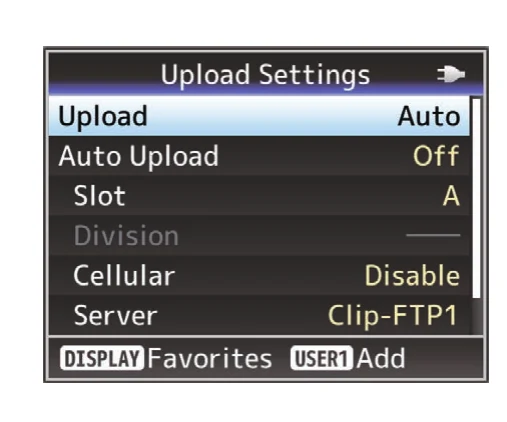
Upload Settings groups the automatic/manual mode, source slot, division interval, cellular allowance and server preset on one screen.
JVC GY-HC500/GY-HC550 Instructions · PDF p. 190 ↗Instructional excerpt from an official JVCKENWOOD manual; copyright remains with JVCKENWOOD.Upload Settings groups the automatic/manual mode, source slot, division interval, cellular allowance and server preset on one screen.
JVC GY-HC500/GY-HC550 Instructions · PDF p. 190 ↗Instructional excerpt from an official JVCKENWOOD manual; copyright remains with JVCKENWOOD.Upload Settings groups the automatic/manual mode, source slot, division interval, cellular allowance and server preset on one screen.
JVC GY-HC500/GY-HC550 Instructions · PDF p. 190 ↗Instructional excerpt from an official JVCKENWOOD manual; copyright remains with JVCKENWOOD.Upload Settings groups the automatic/manual mode, source slot, division interval, cellular allowance and server preset on one screen.
JVC GY-HC500/GY-HC550 Instructions · PDF p. 190 ↗Instructional excerpt from an official JVCKENWOOD manual; copyright remains with JVCKENWOOD.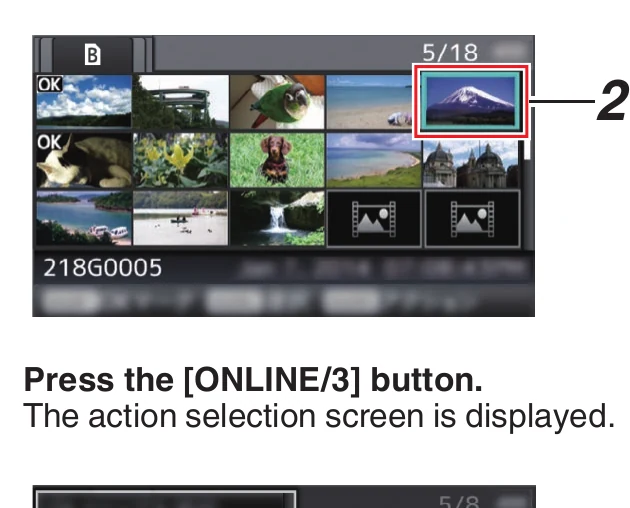
In Media mode, move the cursor to the clip and press ONLINE/3 to open the action menu.
JVC GY-HC500/GY-HC550 Instructions · PDF p. 191 ↗Instructional excerpt from an official JVCKENWOOD manual; copyright remains with JVCKENWOOD.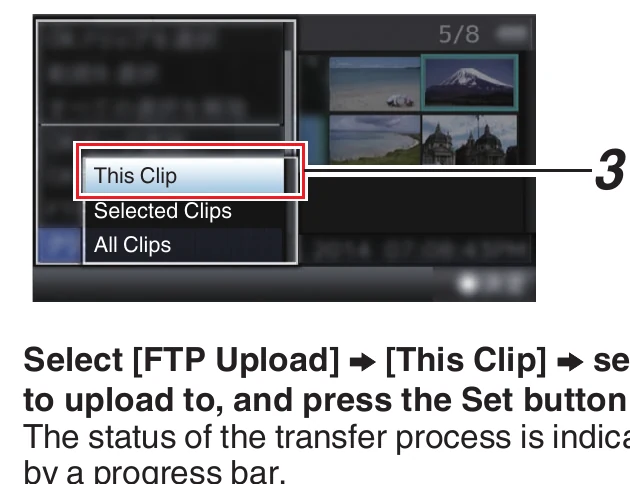
Choose This Clip, Selected Clips or All Clips, then choose the server preset and press Set.
JVC GY-HC500/GY-HC550 Instructions · PDF p. 191 ↗Instructional excerpt from an official JVCKENWOOD manual; copyright remains with JVCKENWOOD.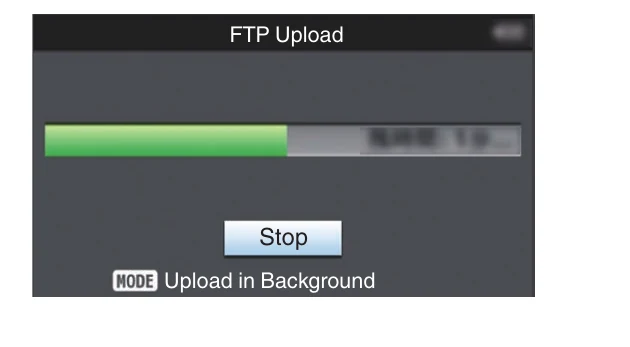
The FTP Upload screen displays transfer progress and provides a Stop control while background upload is active.
JVC GY-HC500/GY-HC550 Instructions · PDF p. 191 ↗Instructional excerpt from an official JVCKENWOOD manual; copyright remains with JVCKENWOOD.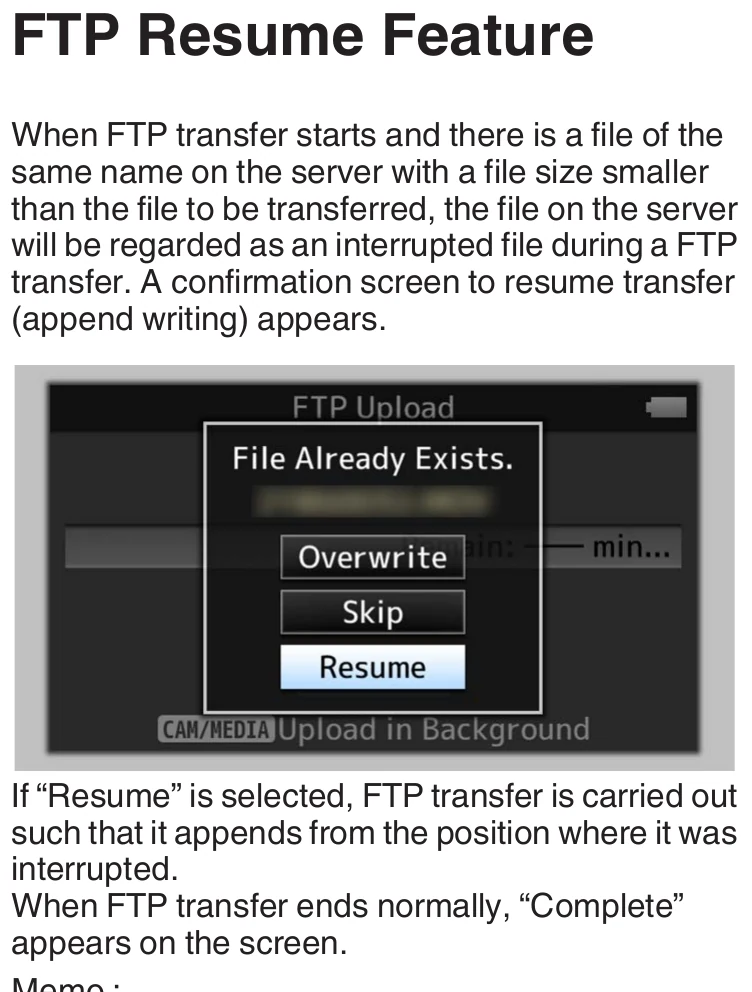
Resume appears only when the server has a smaller partial file with the same name; the manual notes protocol-specific restrictions.
JVC GY-HC500/GY-HC550 Instructions · PDF p. 193 ↗Instructional excerpt from an official JVCKENWOOD manual; copyright remains with JVCKENWOOD.Run this checklist on the exact body, firmware, network, and media format you will use on assignment.
Select Auto, Slot, Server, and Auto Upload On outside High-Speed mode.
Separate recording and transfer slots.
Verify HD+Web, Slot B, Division, and Auto Upload.
Verify host, port, protocol, login, path, and permissions.
Use resume-capable FTP/FTPS/FTPES without HTTP proxy and the correct partial file.
The local archive is retained for research continuity if an official link changes. It is not redistributed through this site.
Printed pp. 148-150, Upload Settings and Clip Server; pp. 189-193, upload workflows and Resume
Open manufacturer source ↗This guide compiles all discovered FTP-related setup evidence for this model, but it is not a promise that every firmware version and venue network will behave identically. Verification records the exact body, firmware, access point, protocol, payload, and result.
Join the founding beta and help turn the documented route into a tested setup guide with original menu photography.
Test this path ↗